A trick to teach you to take off the moon and give it to TA! Believe it or not, I can do it with PPT.
Recently, Douyin has a popular song, "want to pick the stars for you, pick the moon for you …"... " Do you also want to take off the beautiful moon and give it to your man / girlfriend?

Today, let's teach you to draw such a beautiful curved moon. It's not difficult. You can do it with PPT. Come on, get up, you can also take off the moon and give it to TA!

Insert graphics and fill in lines
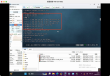
Specific operation: first set the black background, insert a circle, right-click [set shape format], select [solid Color fill], the color is black, and set [Line] to [Wireless Bar].
Second, set the shape format
Specific operation: click "Shadow", select "preset", find "inside" and select the first one, then you can choose a favorite color to fill it.
[transparency] is set to 20 °and [height from the bottom] to 7 pounds.
Third, brighten up the spot
Specific operations:
1. Insert an ellipse, right-click to set [No Contour fill], set [shape format], select [gradient fill], and [Type] is [path]
The gradient aperture has two colors (the first color is darker and the second is lighter), [position], [transparency], and [brightness] are all 0.
two。 Adjust the aperture, pull to the most appropriate position, complete ~
The finished picture is right here, isn't it easy to do? Come and try it, too!