How to debug the workflow WS14000164 of SAP Interaction center inbox
This article introduces you how to debug SAP Interaction center inbox workflow WS14000164, the content is very detailed, interested friends can refer to, hope to be helpful to you.
(1) send an email to the IC inbox via Outlook:
(2) go to Swel to see if there is an entry in the email you just sent

(3) go to tcode SWI1 and you will find that there are two entries in the email you just sent. Select the entry for Status=Ready.

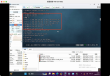
Set the breakpoint in the following method, and then execute the selected entry.
(4) in the debugger, change the content of ls_rfc_est-rfcest to "None". 4) in debugger change the content of ls_rfc_dest-rfcdest to "NONE".
(5) enter SM58, and there is an entry for background execution in step 4.
If no entries are found, check that blocking is marked in the debugger settings.
When you click Debug LUW (debug LUW), a new debugger pops up.
You can now debug workflow execution.
After debugging is complete, you can return to SWI1, and the three background steps have been marked as complete.
You can now find the message in your IC inbox.
On how to debug SAP Interaction center inbox workflow WS14000164 to share here, I hope that the above content can be of some help to you, can learn more knowledge. If you think the article is good, you can share it for more people to see.