How does the xp system turn off the system tone?
This article mainly introduces the xp system how to turn off the system prompt tone, has a certain reference value, interested friends can refer to, I hope you can learn a lot after reading this article, the following let the editor take you to understand it.
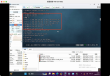
1. Right-click "my computer"-"manage"-"device Manager". Open the View item on the menu and click Show Hidden Devices.
2. Find the "Beep" item in the "non-plug and play driver"-right-click the item and click Properties.
3. Select "do not use this device (deactivate)" in the "device usage" column of the pop-up dialog box, and then click "OK" (or select disable in the previous right-click menu). Finally, restart it.
Thank you for reading this article carefully. I hope the article "how to turn off the system prompt tone in xp system" shared by the editor will be helpful to everyone. At the same time, I also hope that you will support us and pay attention to the industry information channel. More related knowledge is waiting for you to learn!