Wps's method of setting headers for a single page
Editor to share with you wps to a single page to set the header method, I believe that most people do not know much, so share this article for your reference, I hope you will learn a lot after reading this article, let's go to know it!
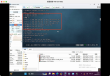
Wps to a single page to set the header: 1, open wps, switch to the [page layout] column; 2, click the [separator], [the next section break] option; 3, double-click the mouse header, click the [header and footer] option.
The specific methods are as follows:
Open the WPS software, click the "page layout" option, and select the "separator" option.
Select the next section break option to make the second page a separate section.
Double-click the mouse at the header of the second section to enter the header editing state and click "header and footer" to disconnect the previous section from the previous section.
The above is all the contents of the article "how to set headers for a single page by wps". Thank you for reading! I believe we all have a certain understanding, hope to share the content to help you, if you want to learn more knowledge, welcome to follow the industry information channel!