
Disk management quotas and raid configuration
Disk management quota and raid configuration disk structure

MBR and disk partition representation
Master Boot record (MBR:Master Boot Record)
MBR is located in the first physical sector of the hard disk. The MBR contains the main boot program and the partition table of the hard disk.
The partition table has 4 partition record areas, each accounting for 16 bytes
Hard drives, partitions and other devices are represented as files in Linux
Disk partition structure
There are only four primary partitions in the hard disk, so the serial numbers of primary and extended partitions are limited to 1-4.
The sequence number of the extended partition subdivided into logical partitions will always start at 5.
Detect and confirm new hard drive-fdisk
View or manage disk partition fdisk-l
Common commands in interactive mode
M help p print display n create new new partition d delete partition t conversion format w save configuration Q exit easy operation as shown in the figure
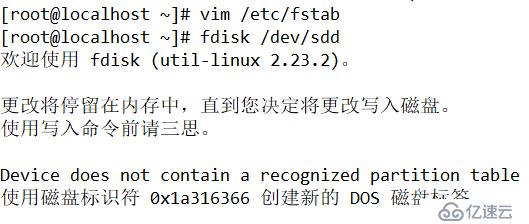
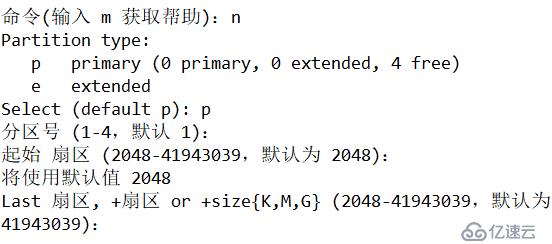
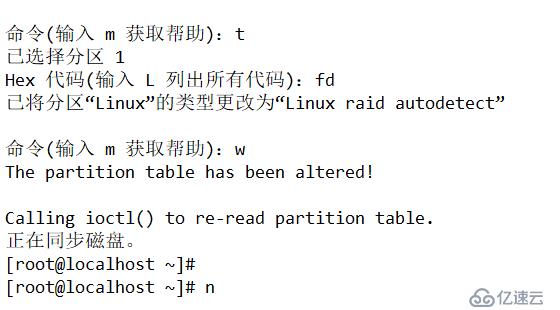
Format mkfs
Mkfs-t file system type partition device
Create a swap file
Mkswap Partition device
Mount-mount unmount file system-umount
Mount [- t type] storage device mount point
Basic Concepts of LVM Mechanism
PV (physical volume) VG (volume group) LV (logical volume)
Main command
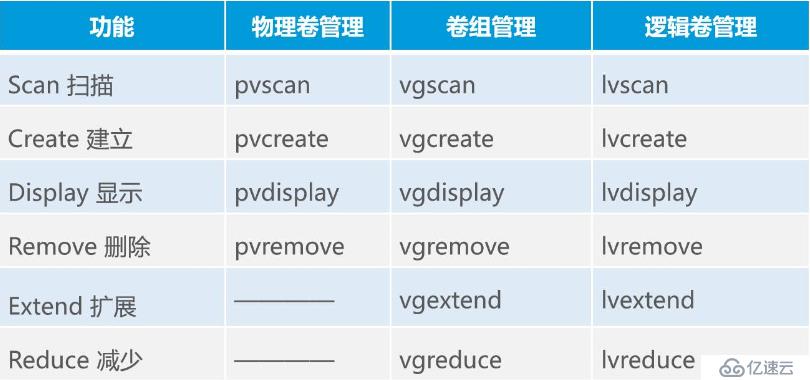
Overview of disk quota
Conditions for realizing disk quota: Linux kernel is required to support the installation of xfsprogs and quota packages
Characteristics of Linux disk quota
Scope: for the specified file system (partition)
Quota object: user account, group account
Type of limit: disk capacity, number of files
Limit method: soft limit, hard limit (soft limit
